Google Cloud Organisation Bootstrap#
This guide provides a high-level overview of bootstrapping a Google Cloud organization using the terraform-google-organization module. This process establishes a secure, scalable, and well-structured foundation for your cloud resources.
Overview#
Bootstrapping your Google Cloud organization with this module provides an easy way to start your cloud journey. It automates the creation of foundational resources, ensuring that best practices for security, logging, and resource management are implemented from day one. By using Infrastructure-as-Code (IaC), this setup is repeatable, auditable, and easy to manage.
Prerequisites#
Before you begin, ensure you have the following:
- A Google Cloud Organization: This module configures an existing organization. If you do not have one, you must first create it. Please follow the official Google Cloud documentation: Creating and managing organization resources.
- Google Workspace or Cloud Identity: An organization is tied to a Google Workspace or Cloud Identity account.
- Required Permissions: The user or service account running Terraform needs appropriate permissions at the organization level (e.g.,
Organization Administrator,Project Creator,Billing Account Admin). - Tools:
- Terraform (
~> 1.0) - Google Cloud SDK (
gcloud) - Terragrunt
What will be created?#
The terraform-google-organization module will provision the following core components in your organization:
1. Core Management Infrastructure#
A dedicated project is created to manage your Infrastructure-as-Code (IaC) resources. This includes:
- Terraform State Storage: A versioned Google Cloud Storage (GCS) bucket is set up to securely store your Terraform state files. This is crucial for managing your infrastructure collaboratively and preventing state corruption.
- Terraform Service Account: A dedicated service account is created with the principle of least privilege for Terraform to use for subsequent deployments.
2. Hierarchical Folder Structure#
The module helps you organize your GCP resources by creating a hierarchical folder structure. This allows you to group projects and resources logically, for example by environment (e.g., prod, nonprod), department, or application. This structure is highly flexible and can be customized up to four levels deep.
3. Centralized Audit & Logging#
A dedicated audit project is created to centralize all audit logs. This is a security best practice.
- Organization-wide Log Sink: It configures a log sink to export audit logs from across the organization (or a specific folder) to a dedicated GCS bucket within the audit project.
- Log Bucket with Versioning: The GCS bucket for logs has versioning enabled to protect against accidental deletion or modification of log data.
4. Security & Identity and Access Management (IAM)#
The module establishes a strong security posture from the start:
- Least-privilege Service Accounts: The Terraform service account is configured with just the permissions it needs.
- Centralized IAM Roles: You can define IAM permissions at the organization and folder levels.
- [EXPERIMENTAL] Group-based Permissions: The module provides an experimental feature to assign a predefined set of roles to Google Groups for common administrative functions (e.g.,
gcp-network-admins,gcp-security-admins).
Example Resource Hierarchies#
This module enables you to create various resource hierarchies. The following diagrams illustrate possible hierarchies based on Google Cloud's best practices for resource hierarchy.
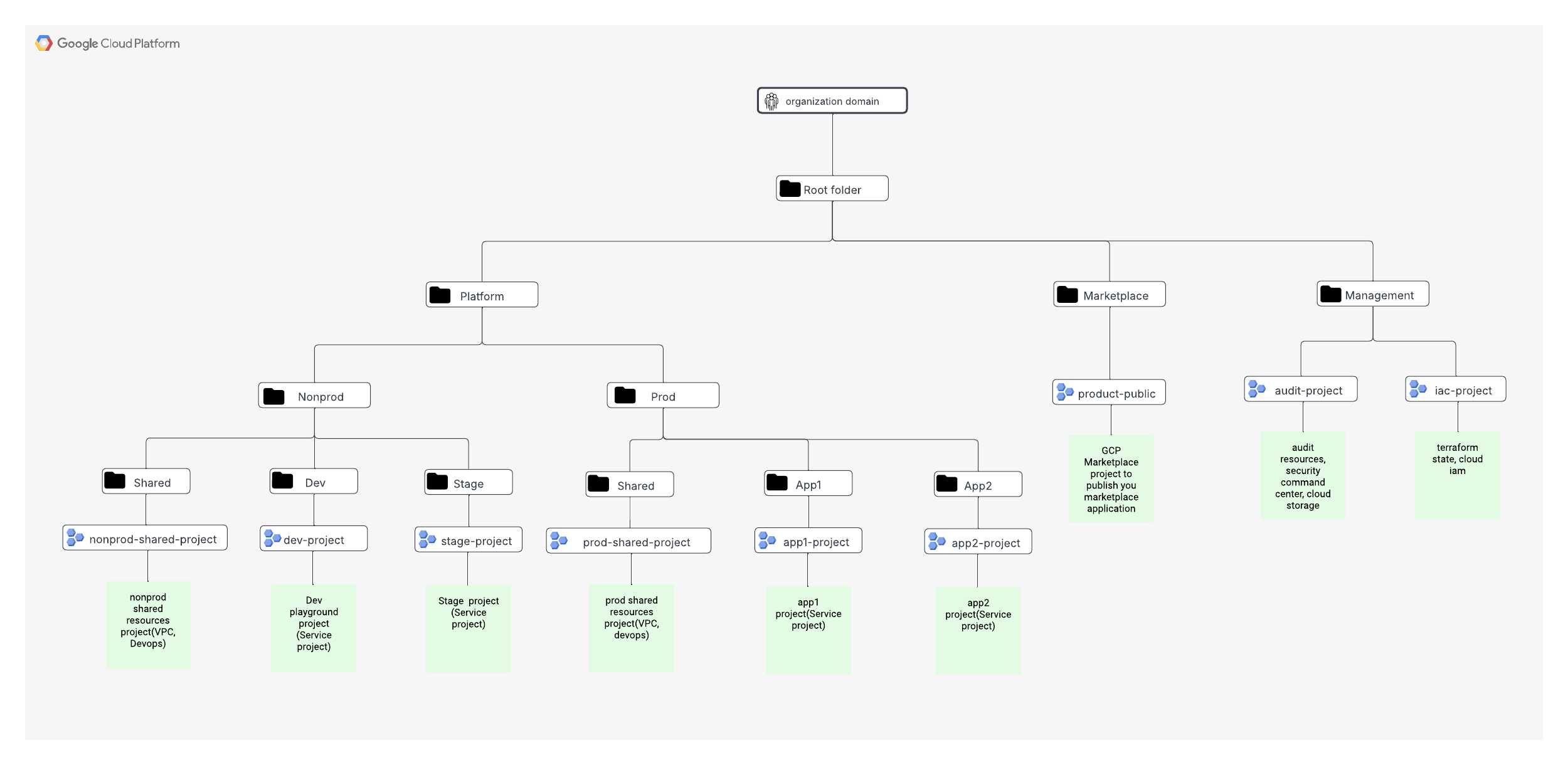
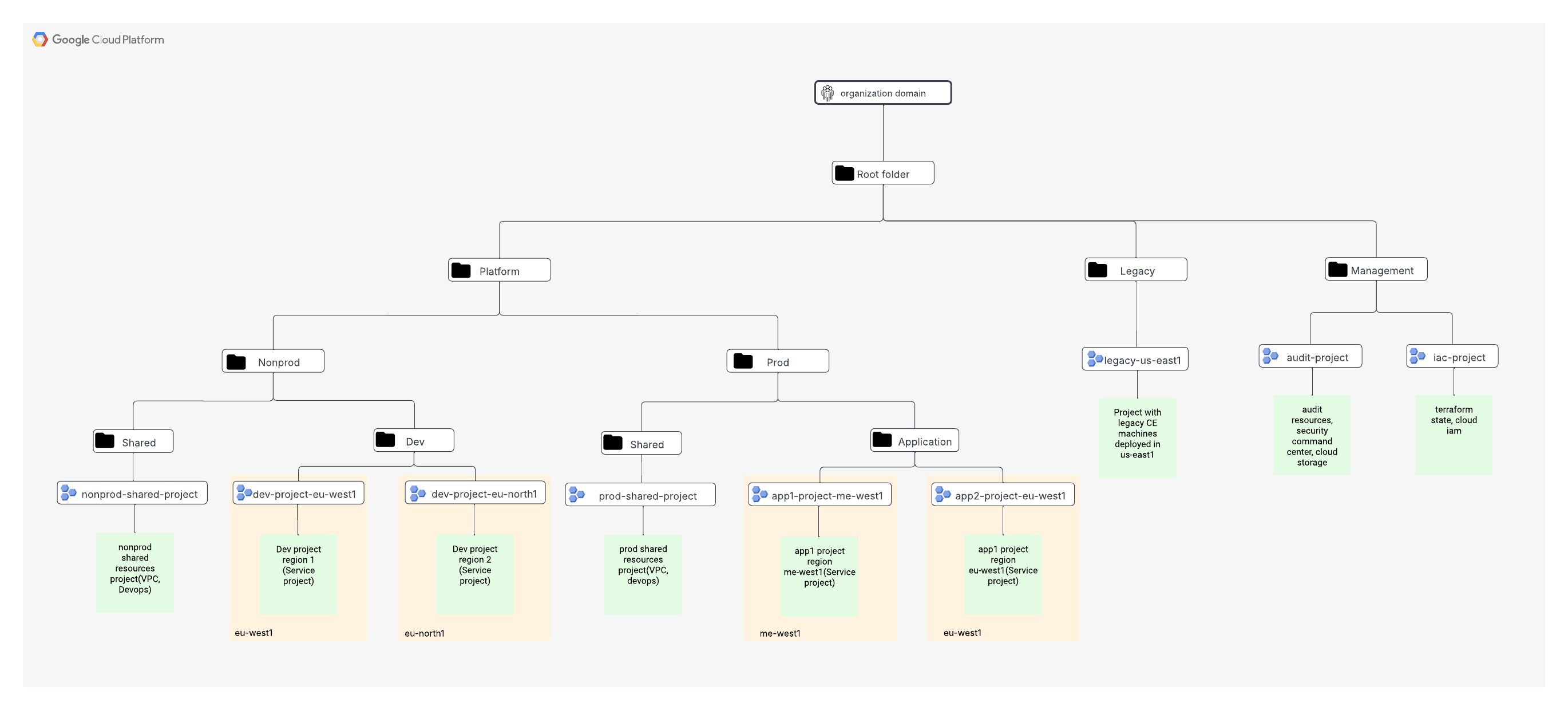
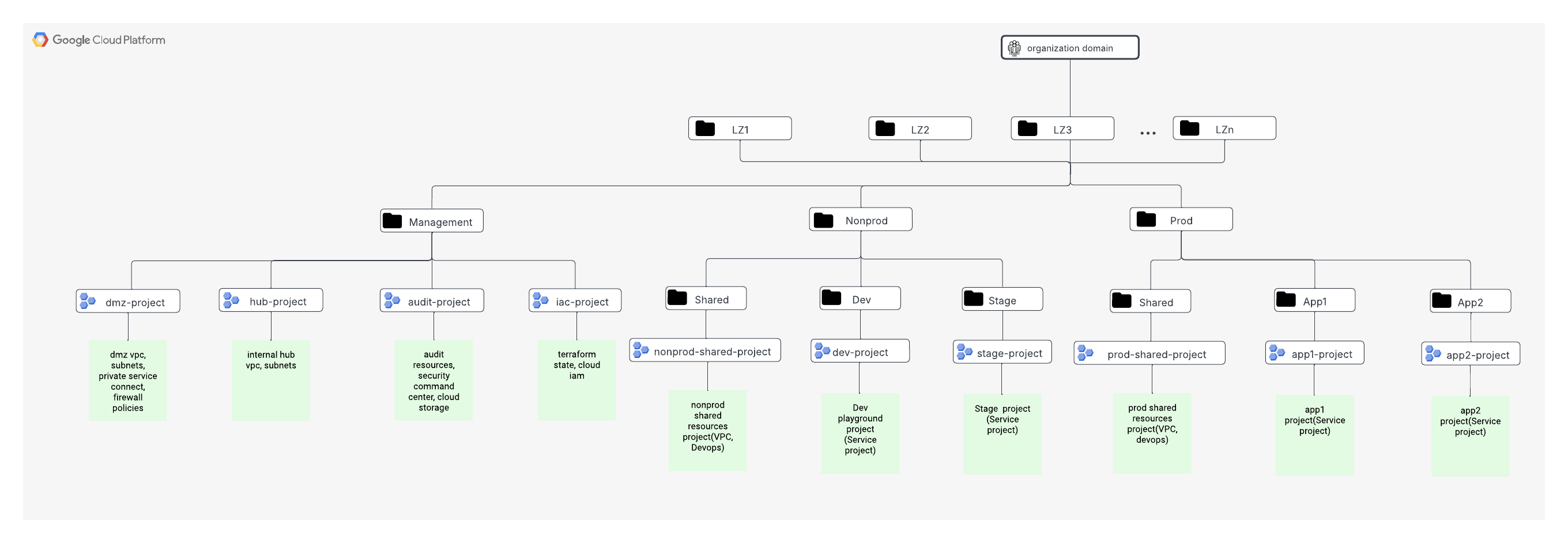
Note: The images linked above are examples. You will need to ensure the images exist at the specified path or update the links accordingly.